
You have ideas. Dozens of them. But between having the idea and shipping it, there's a gap that used to require engineers, agencies, or months of learning to code.
That gap is closed.
In a live LinkedIn webinar with Ariel, I built three real AI agents from scratch - a company intelligence agent, a content writing agent, and a data dashboard - all without writing a single line of code myself. The entire audience watched it happen in real time.
This guide breaks down exactly what we built, the prompts we used, and how you can copy the same approach to build your own AI agents today.
Watch the Full Walkthrough
What You'll Build
Company Intelligence Agent
A /intel skill that researches any company and produces a structured profile - leadership, funding, tech stack, pain points, content strategy - all from a single command.
Content Writing Agent
A /write skill that takes company intelligence and turns it into targeted content - LinkedIn posts, emails, case studies - in your brand voice.
Live Dashboard
A visual dashboard that displays all your generated company profiles in one place, built by Claude in minutes.
Each of these was built live, on camera, using plain English prompts. No IDE. No coding bootcamp. Just Claude Code and clear instructions.
Key Concepts: Claude Chat vs Cowork vs Code
Before we build, you need to understand the three levels of Claude. Think of it as a housing metaphor:
- Claude Chat is a sandbox. Great for questions, brainstorming, analysis. But it can't touch your files or system.
- Claude Cowork is like an apartment. It can work on your computer - organize files, fill out forms, browse the web - but with guardrails.
- Claude Code is full access. It reads your files, writes code, runs terminal commands, and builds real applications. This is where agents live.
For everything in this guide, you need Claude Code (Max subscription, $100-200/month).
Context
New to these differences? Our Claude vs Cowork vs Code comparison guide breaks down exactly which tool to use for what.
Part 1: Building the Company Intelligence Agent
This is the agent that changed how I prepare for every meeting, sales call, and partnership conversation. One command. Deep company intelligence. Every time.
What It Does
The /intel skill takes a company website and produces a structured intelligence profile:
- Value proposition - what they do, who they serve, how they position it
- Target audience & pain points - who they're selling to and what problems they solve
- Voice & tone - formality level, vocabulary, personality traits
- Competitive positioning - how they differentiate, key proof points
- Evidence - numbers, testimonials, results they cite
The Prompt
Here's the actual prompt we used to create the skill. You tell Claude Code to build it:
Create the /intel company intelligence skill
Create a Claude Code skill called /intel. It should analyze any company website I give it. Find and read the sitemap and key pages (homepage, pricing, about, features). Extract the value proposition, target audience and their pain points, and the company's voice and tone (formality, vocabulary, personality). Identify competitive positioning and key proof points (numbers, testimonials, results). Save the full analysis as a structured markdown file in profiles/[company-name].md. Make the output really structured and useful.
Tip
Pro tip: We used Plan Mode first. Before Claude built anything, we had it plan the skill structure, discuss what sections to include, and agree on the output format. Always plan before you build.
Running It Live
Once Claude creates the skill file, using it is this simple:
What the Output Looks Like
The generated profile is a structured markdown document - typically 2-4 pages - with sections you can immediately use:
This isn't a generic summary you'd get from ChatGPT. It's a structured, saved, reusable intelligence file that other agents can build on.
Part 2: Building the Content Writing Agent
Here's where things get powerful. The /write agent doesn't work in isolation - it reads the output from /intel.
How /write Depends on /intel
This is the key insight: agents build on each other's output.
When you run /write, it:
- Reads the company profile generated by
/intel - Asks what content type you want
- Writes using the company's actual voice, vocabulary, and proof points
- Follows anti-AI-smell rules so the output reads like a human wrote it
The Prompt
Create the /write content writing skill
Create a Claude Code skill called /write. It should read the company profile from the profiles/ folder, then ask what type of content I want (LinkedIn post, blog outline, or email). Write the content using the company's voice, vocabulary, and proof points from the profile. Include anti-AI-smell rules - no 'delve', 'leverage', 'utilize', 'in today's landscape'. Use contractions. Mix sentence lengths. Be specific. After the content, add a brief note explaining the voice choices it made.
The Skill Ecosystem
The real power isn't any single agent. It's the system. Here's what we demonstrated in the webinar:
/intel [company]
Researches the company and saves a structured profile
/write [company] [type]
Reads the profile and creates targeted content
/edit [file]
Refines and polishes any draft based on feedback
/rewrite [file] [platform]
Adapts content for different platforms (LinkedIn, email, Twitter)
One research pass. Multiple content pieces. All personalized. All consistent. That's what an AI operating system looks like.
Free: Claude Code Survival Kit
10 mistakes that cost me 100+ hours (and how to fix them) + a 1-page cheat sheet.
Part 3: Building a Dashboard
The final demo was the quickest - and blew people's minds the most. We asked Claude Code to build a visual dashboard that displays all the company profiles we'd generated.
No Figma. No React tutorial. Just:
Build a profile dashboard
Build me a simple web dashboard that reads all company profiles from the /profiles directory and shows each company as a card with key stats (name, industry, funding, team size). Let me click into any company to see the full profile. Clean, minimal design - dark sidebar, white content area. Run it locally so I can view it in my browser.
Claude Code read the profiles, built a Next.js app, styled it, and had it running on localhost in minutes. Live. On camera.
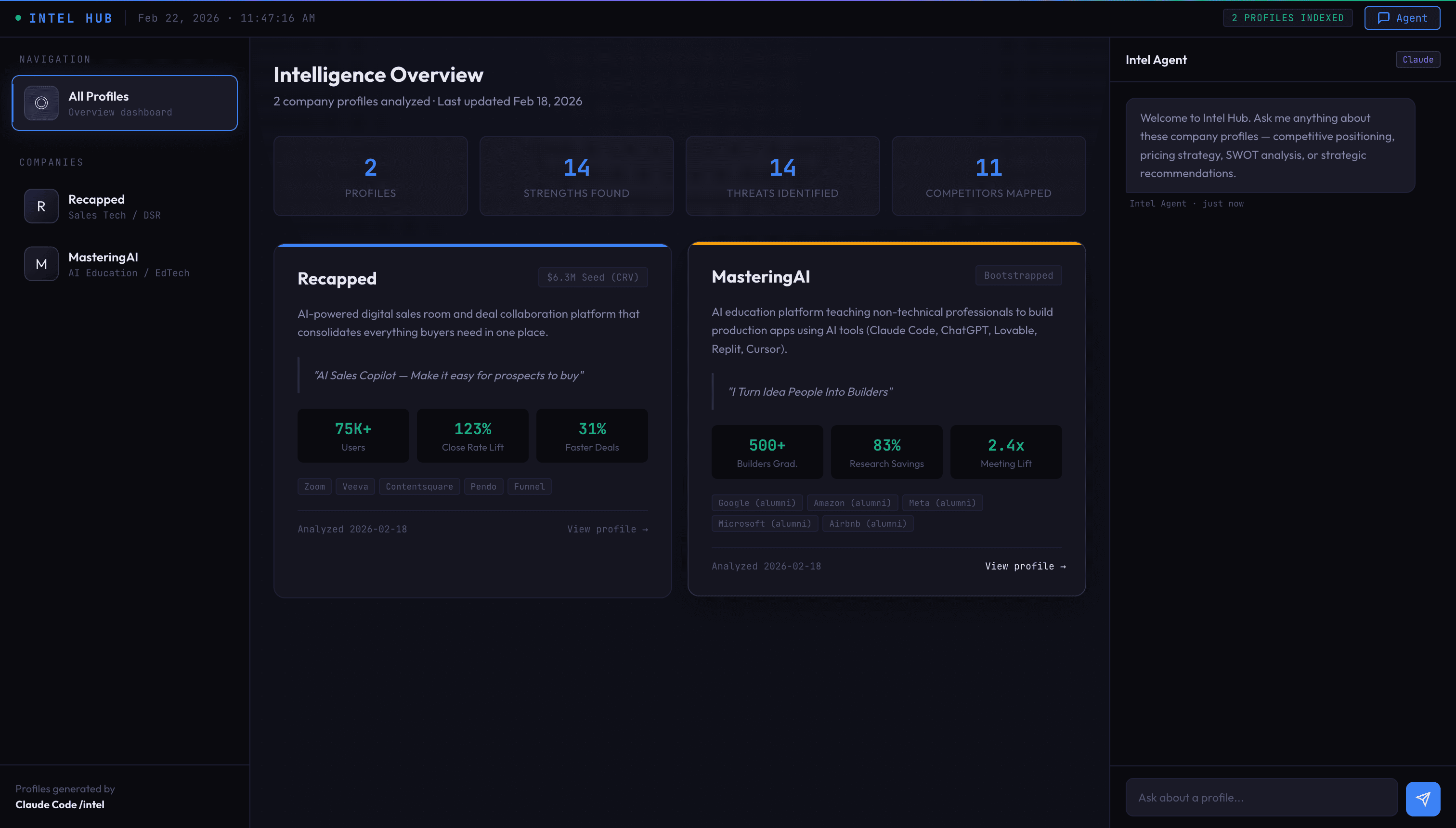
That's the gap closing in real time. The idea-to-built pipeline went from months to minutes.
Skill · AI Marketplace
Artifacts Builder
Use Claude Code to build interactive React components and UI prototypes with Tailwind and shadcn/ui. Share working demos without setup.
Build an interactive dashboardThe Bigger Picture: Your AI Operating System
What we showed in the webinar is just one use case. But the pattern scales to everything.
I'm not a developer. I'm what I call an idea engineer - someone who uses AI to turn ideas into reality without writing code.
You don't need to become a developer. You need to become an idea engineer. Someone who can describe what they want clearly enough that AI builds it for them. That's the new skill. That's what separates people who ship from people who wait.
The agents shown in this webinar are just the beginning. The same pattern works for:
- Meeting prep agents - auto-research everyone in your next meeting
- Email response agents - draft replies in your voice using conversation history
- Report generators - pull data from multiple sources into formatted reports, which is where you build an MCP server to reach live data instead of exports
- Competitive analysis agents - monitor competitors and flag changes
- Social media agents - create platform-specific content from a single brief
Every one of these follows the same build pattern you just learned.
Principles That Make This Work
After building 30+ agents, these are the principles that separate agents that work from agents that don't:
1. Plan Mode First - Always
Never let Claude just start building. Enter Plan Mode (Shift+Tab twice), describe what you want, and review the plan before executing. This one habit will save you hours of backtracking.
2. Context Is King
The more context you give Claude, the better the output. That means:
- Reference specific files (
read my brand.md for voice guidelines) - Provide examples of what good output looks like
- Be explicit about format, length, and structure
3. Iterate, Don't One-Shot
Your first version won't be perfect. That's fine. Run the agent, review the output, refine the prompt, run again. Three iterations usually gets you to 90%+ quality.
4. Start Basic, Then Expand
Don't try to build a complex multi-step agent on day one. Start with a simple single-task agent. Get it working. Then add features, chaining, and edge cases.
5. Think in Systems
Individual agents are useful. Connected agents are transformative. Design your agents to produce output that other agents can consume. That's how you build an AI operating system, not just a collection of tools.
Key insight
The multiplier effect: A single agent saves you time. A system of connected agents changes what's possible. The /intel → /write → /edit chain produces in 5 minutes what used to take a team 2 days.
Your First Agent in 10 Minutes
Ready to build? Here's a copy-paste starter prompt. Open Claude Code and paste this:
That's it. Ten minutes from now, you'll have your first working AI agent.
From there, the playbook is simple: build one agent. Use it for a week. Notice what's missing. Build the next one. Before you know it, you'll have an AI operating system custom-built for how you work.
Don't want to start from scratch? The AI Builder Toolkit comes with 30+ pre-built skills, prompts, and workflows you can install in one click - including the /intel and /write agents from this walkthrough.
Want to build live with us? Join the next MasteringAI Workshop where we build agents together in real time, answer your questions, and help you ship your first skill before you leave.
Success
What will you build? Every agent starts with a single prompt. The webinar showed three. You only need one to start. Pick the task you do most often, describe it clearly, and let Claude build the agent for you.
Skills Setup
Complete Guide to Setting Up Claude Code Skills
Get the AI Builder Toolkit
Pre-built skills, prompts, and workflows you can install in one click. Stop building from scratch — start with a system.
- 30+ ready-to-use skills
- Copy-paste prompts
- Plug-and-play workflows
Keep reading
15 min · Level Up
Claude Code Agents, Skills, Hooks, and MCP Explained
28 min · Getting Started
Claude Code Skills: The Complete Setup and Creation Guide
15 min · Blog
Claude Cowork vs Claude Code: Which to Use in 2026
24 min · Getting Started
Claude Code Tutorial for Beginners (No Coding Required) - Complete 2026 Guide
FAQ
Common questions
No. Everything shown in this walkthrough was built using plain English prompts. Claude Code handles the technical implementation. You describe what you want the agent to do, provide examples and context, and Claude writes the skill file for you.
Claude Chat is like a sandbox - you can ask questions but it can't touch your files. Claude Cowork is like an apartment - it can work on your computer with guardrails. Claude Code is full access to your system - it reads files, writes code, runs commands, and builds real applications. For building agents, you want Claude Code.
Claude Code requires a Max subscription at $100/month or $200/month. For the agents shown here, the cost is minimal - each skill invocation uses a small amount of context. You can build and run 30+ agents for the same subscription price, making it far cheaper than hiring developers or agencies.
A skill is a reusable instruction file (SKILL.md) that Claude follows when you invoke it with a slash command like /intel or /write. It contains your prompt, context, and workflow steps. Think of it as teaching Claude a repeatable task once so you never have to explain it again.
Yes, and that is where the real power lives. The /intel agent builds a company profile, /write uses that profile to draft content, /edit refines it, and /rewrite adapts it for different platforms. Each agent builds on the output of the previous one, creating a complete content pipeline.
Your first simple agent takes about 10 minutes. The company intelligence agent shown in the walkthrough was built live in under 30 minutes. As you get comfortable, you can create new agents in 5-10 minutes because the pattern is always the same: describe the task, provide context, test, and iterate.
Almost anything that involves processing information and producing output. Common examples include: company research agents, content writing agents, email drafters, meeting summary processors, competitive analysis tools, report generators, data dashboards, social media schedulers, and customer response templates. If you can describe the task, Claude can automate it.
Finished reading?
Take it with you.
Get a downloadable checklist from Live Masterclass: How to Build AI Agents with Claude Code, plus weekly AI tips.
Guide checklist
PDF + email series